
To view your FTP details over a secure connection please follow the steps below.
1. Log into your D9 Client Area and click on Services > My Services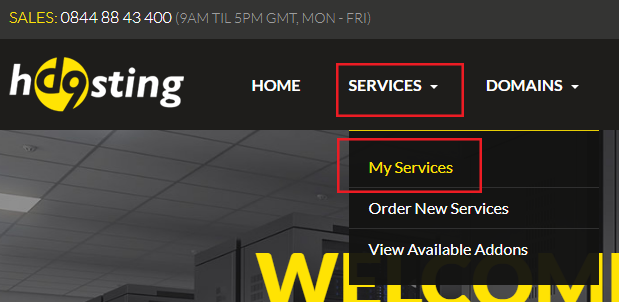
2. Click on the "Active" text next to your web hosting account
3. You will then see your FTP connection details under the "Server Details" heading along with other information about your hosting account displayed on the page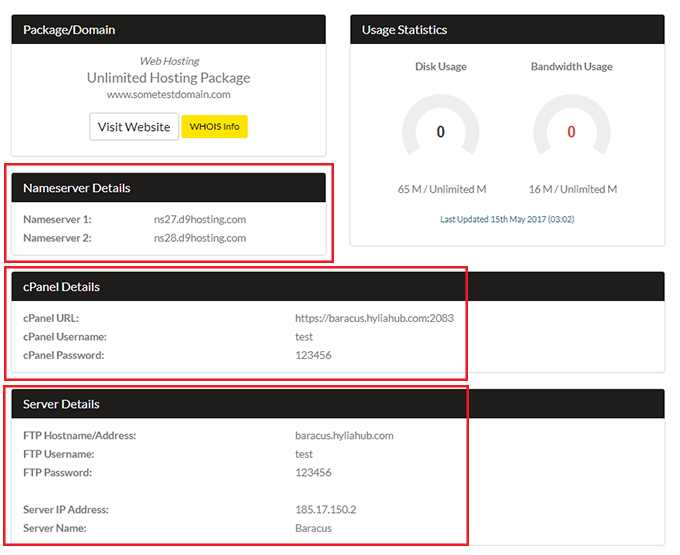
Please remember that these login details are CaSe SEnSiTivE, they should be copied and pasted EXACTLY with no extraneous spaces at the beginning or end.
Dev License: This installation of WHMCS is running under a Development License and is not authorized to be used for production use. Please report any cases of abuse to abuse@whmcs.com
What Are My FTP Details? Print
- 275
Was this answer helpful?
Related Articles
How To View .htaccess
Viewing your .htaccess file can be a great way to troubleshoot common problems, however sometimes...
How Do I Log Into My Control Panel (cPanel)?
To view your cPanel login details over a secure connection please follow the steps below. 1. Log...
How Do I Change My cPanel Password?
If you wish to change your password, you can do so quickly and easily via your cPanel.
It is...
How Do I Make a Backup of My Account?
At D9 Hosting we automatically back up your files on weekly basis. However, we always advise our...
What Is The MySQL Database Hostname?
When installing a script, you will be asked to enter your database host name. This is: localhost...
Powered by WHMCompleteSolution