
There are two ways to access to your cPanel.
Option One
Open up a web browser and navigate to your-domain-here.com/cpanel
*ensure you replace your-domain-here.com with your actual domain name!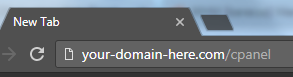
Option Two
1. Login to your D9 Client Area at https://d9clients.com/clientarea.php
2. Click on Services > My Services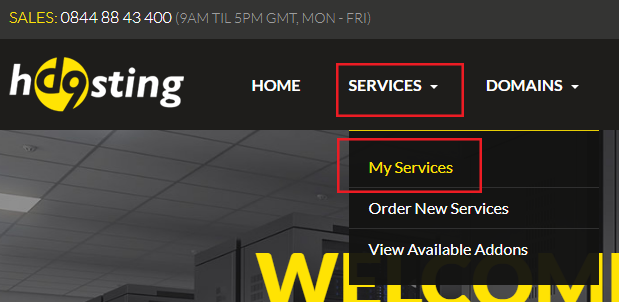
3. Click the green "Active" button to the right of your service
4. In the Overview column on the left, click the Login to cPanel button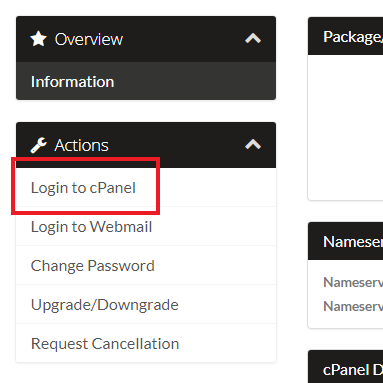
Note: If you are unsure of your cPanel login details. Please see the following guide.
Dev License: This installation of WHMCS is running under a Development License and is not authorized to be used for production use. Please report any cases of abuse to abuse@whmcs.com
How to Login to cPanel Print
- 28
Was this answer helpful?
Related Articles
How To Create An Email Account in cPanel
Creating a new Email Account in cPanel can be achieved by following the simple steps below:1. Log...
How To Find Email Client Configuration Settings in cPanel
IMPORTANT: This guide only applies to Email Accounts that have been created via cPanel. If you...
What Is The File Usage Limit In cPanel?
By default, all shared and reseller hosting accounts have a file usage limit, this is also...
Enabling Two-Factor Authentication in cPanel
Two-Factor Authentication (often called Multi Factor Authentication) adds an extra layer of...
How to Create an Addon Domain in cPanel
To create an addon domain in cPanel, follow the steps below:1. Login to your cPanel2. Locate and...
Powered by WHMCompleteSolution